FAQ on Poster Designing and Printing
What is your normal turnaround time?
Assuming we encounter no problems with your file then all poster print orders received before 12.00pm Monday to Friday will be shipped the next business day for delivery to you by 5.30pm the following business day. For very urgent poster print orders we offer a same day print service - If ordered before 12.00pm Monday to Friday your poster will be shipped that same day for delivery to you by 10.30am the next business day.
What program should I use to create my poster?
 Microsoft Powerpoint, Word and Excel users should save their files as a PDF to
ensure fonts and images print correctly. Other supported software applications for poster graphics include
InDesign, Photoshop and Illustrator.
Microsoft Powerpoint, Word and Excel users should save their files as a PDF to
ensure fonts and images print correctly. Other supported software applications for poster graphics include
InDesign, Photoshop and Illustrator.
What is the best way to set up my Powerpoint file?
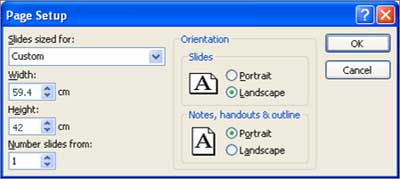
Before you start designing your Powerpoint page for a poster, go to the File menu select "Page Setup". If you are using Microsoft Office PowerPoint 2010, click on the Design tab at the top and then click on the “Page Setup” button. Under "Slides Sized for:" choose "Custom" and then set the page size to the same size that you want your poster to be.
 |
|---|
| For example, if you want your poster to be A0, then set the custom page size in Powerpoint to 84.1cm x 118.9cm |
Save your Powerpoint file as PDF
Important - We cannot print directly from Microsoft Powerpoint, users should save their Powerpoint files as a PDF to ensure fonts and images print correctly.
Instructions for Windows
- From PowerPoint, click the "Office" button.
- What and where is the Microsoft Office Button?
- Hover over "Save File", move the mouse to "Adobe PDF" and click.
- Choose "Optimize for: Standard (publishing online and printing)"
- Confirm the file name and folder, then save.
- The PDF should open automatically once it has been created, and you should proof carefully before submitting.
Instructions for Mac OS X
- Click on the "File" menu, then "Print." Tick the box that says "Scale to Fit Paper."
- The preview box will readjust, then click on the PDF dropdown menu (bottom left of Print screen).
- Select the first option to "Save as PDF".
- Confirm file name and folder, then click "Save".
- Confirm that you would like to change the extension from ".ppt" to ".pdf".
- To proof the PDF before submitting, please find the file in the folder you saved the PDF to.
How do I know if my file will print OK?
Free Report - Not sure if your file is suitable for poster printing? Use our free artwork report service to upload your files and ask any questions you may have. We will email you back a free report on your file's suitability to print at that size and to highlight any other issues that may effect the quality of your poster print.
Advice on Designing Scientific and Medical Research Posters
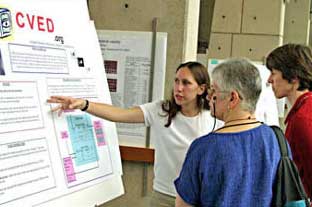 "A scientific poster can communicate your research at a scientific meeting,
and is composed of a short title, an introduction to your question, an overview
of your experimental approach, your results, some insightful discussion of
those results, a listing of previously published articles that are important
to your research, and some brief acknowledgement of the tremendous assistance
and financial support from others.
"A scientific poster can communicate your research at a scientific meeting,
and is composed of a short title, an introduction to your question, an overview
of your experimental approach, your results, some insightful discussion of
those results, a listing of previously published articles that are important
to your research, and some brief acknowledgement of the tremendous assistance
and financial support from others.
If all text is kept to a minimum, a person could fully read your poster in under 10 minutes..........."
 Read more of Colin Purrington's article for more helpful information and advice
on designing scientific
and medical research posters.
PosterGenius Is Specifically For Research Posters
PosterGenius™ is the first application specifically designed for the creation of your scientific posters. It is a powerful, user-friendly software application, which combines a series of automations with 100+ professionally designed templates to help you create your best looking scientific poster, in less than 10 minutes.
 |
|---|
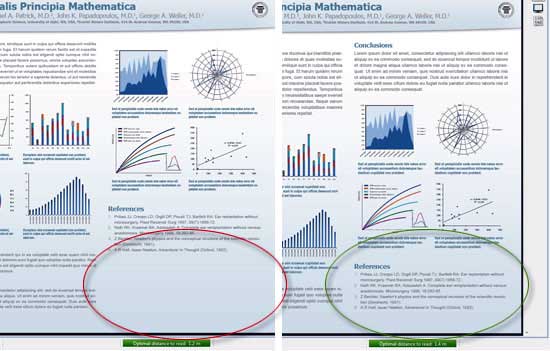
| The powerful poster optimiser automatically adjusts a series of typographic parameters such as font-size, line-height and paragraph space to make the content perfectly fit to the available space on the poster, while maintaining an aesthetic result. Designed by physicians, scientists and researchers and created by software engineers in cooperation with graphic designers, PosterGenius™ offers a workflow tailored to the needs of everyone who creates a poster presentation. Available in both PC and Mac versions. |
 |
Poster 'A' Sizes
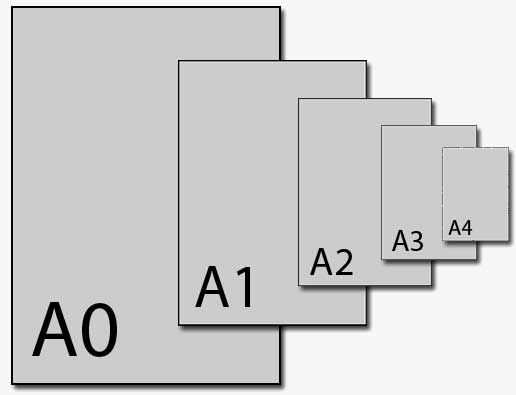
| Size | Width x Height (mm) | Width x Height (in) |
|---|---|---|
| A0 | 841 x 1189 mm | 33.1 x 46.8 in |
| A1 | 594 x 841 mm | 23.4 x 33.1 in |
| A2 | 420 x 594 mm | 16.5 x 23.4 in |
| A3 | 297 x 420 mm | 11.7 x 16.5 in |
| A4 | 210 x 297 mm | 8.3 x 11.7 in |
| A5 | 148 x 210 mm | 5.8 x 8.3 in |